A/B Updates with Automatic Rollback: Lessons from a Kiosk Fleet
21-10-2026
An update that works on your desk doesn’t prove much. The real test is a device hours away, with a flaky network, a power cut in the middle of an install, and nobody nearby who knows what an SD card is.
We built the update loader for a fleet of Raspberry Pi kiosks. Here’s what kept it working when things went wrong.
The Basic Idea: Two Slots
The core of the design is simple. The device keeps two copies of the application, slot A and slot B. One is active, the other is spare.
An update never touches the running version. It is written to the spare slot, and only once the download is complete and verified does the loader switch to it on the next start.
If the new version doesn’t come up, the loader switches back. The device ends up running the last version that worked instead of a half-installed one.
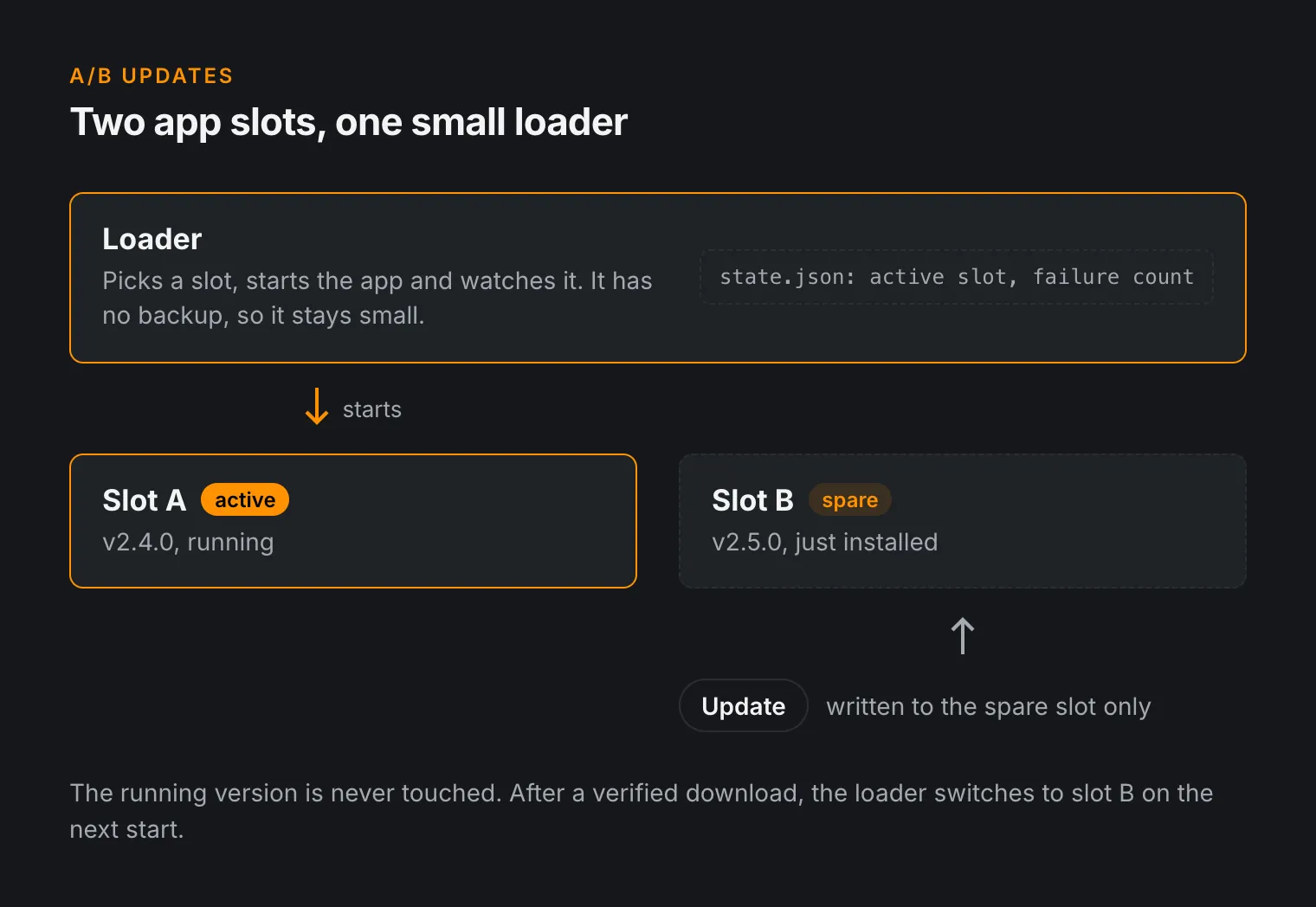
Updates will fail sometimes. What matters is that a failed update never means someone has to drive out to the device.
Deciding When to Roll Back
“Doesn’t come up” needs a precise definition. A single crash isn’t enough reason to roll back, because the network might be down or a peripheral might be slow to start. Switching back every time something hiccups would make the fleet unpredictable.
We count failed starts instead. The loader starts the application in the active slot and records each attempt. If the application exits with an error several times in a row, the loader marks the slot as bad and switches to the other one.
Here’s a simplified version of the logic:
MAX_FAILURES = 3

def run(state):
    slot = state.active_slot

    while True:
        ok = start_and_supervise(slot)

        if ok:
            state.failures = 0
        else:
            state.failures += 1

        if state.failures >= MAX_FAILURES:
            other = "b" if slot == "a" else "a"
            if is_installed(other):
                state.active_slot = other
                state.failures = 0
                slot = other

        save_state(state)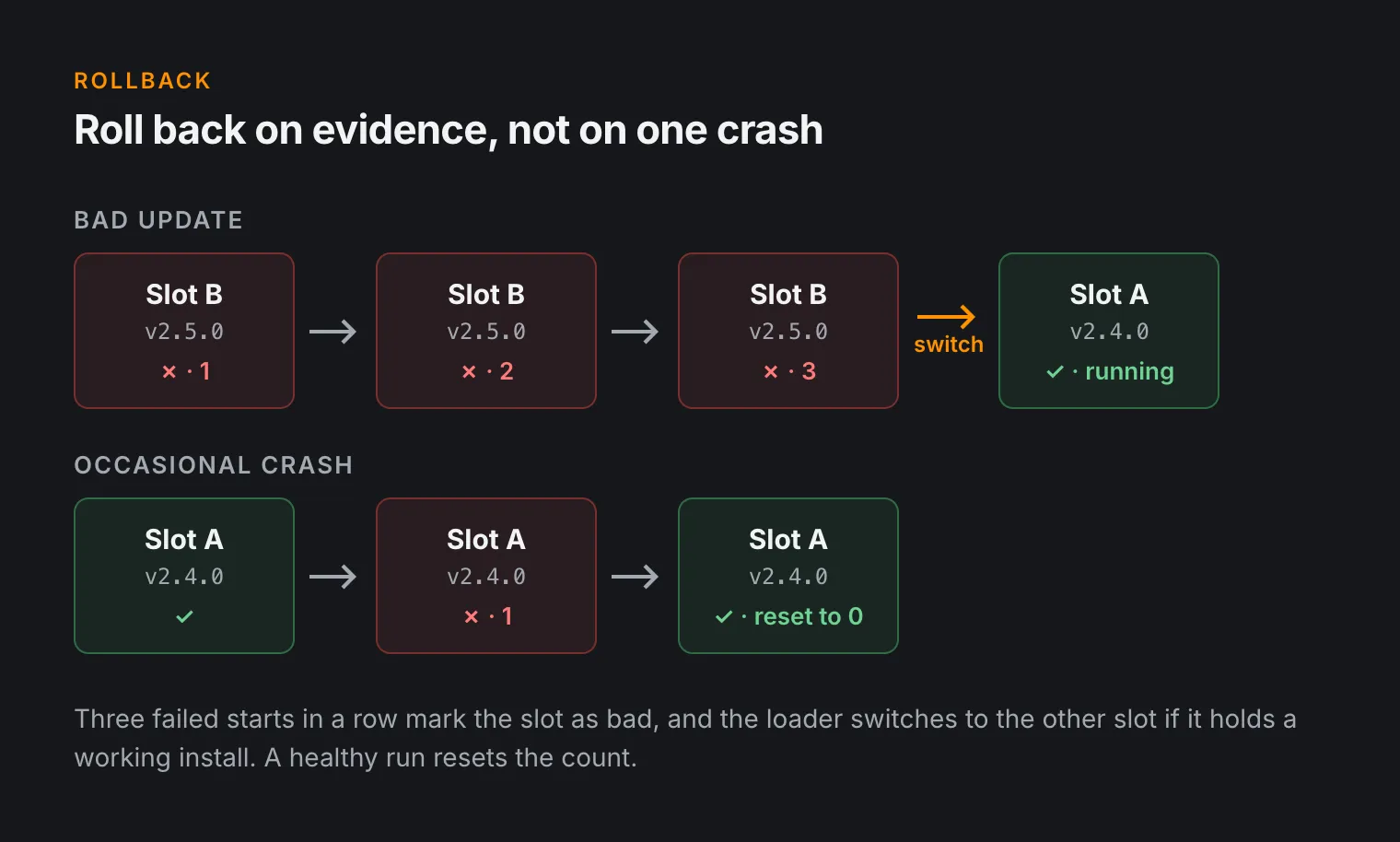
Two small details make a big difference here. The counter resets after a healthy run, so a crash every few weeks never adds up to a rollback. The loader also checks that the other slot actually holds a working installation before switching to it.
The Loader Is the Weak Point
A/B slots give the application a backup, but the loader that picks between them doesn’t have one. If it breaks, both slots are useless, so you have to write it with a lot more care.
State Is Written Atomically
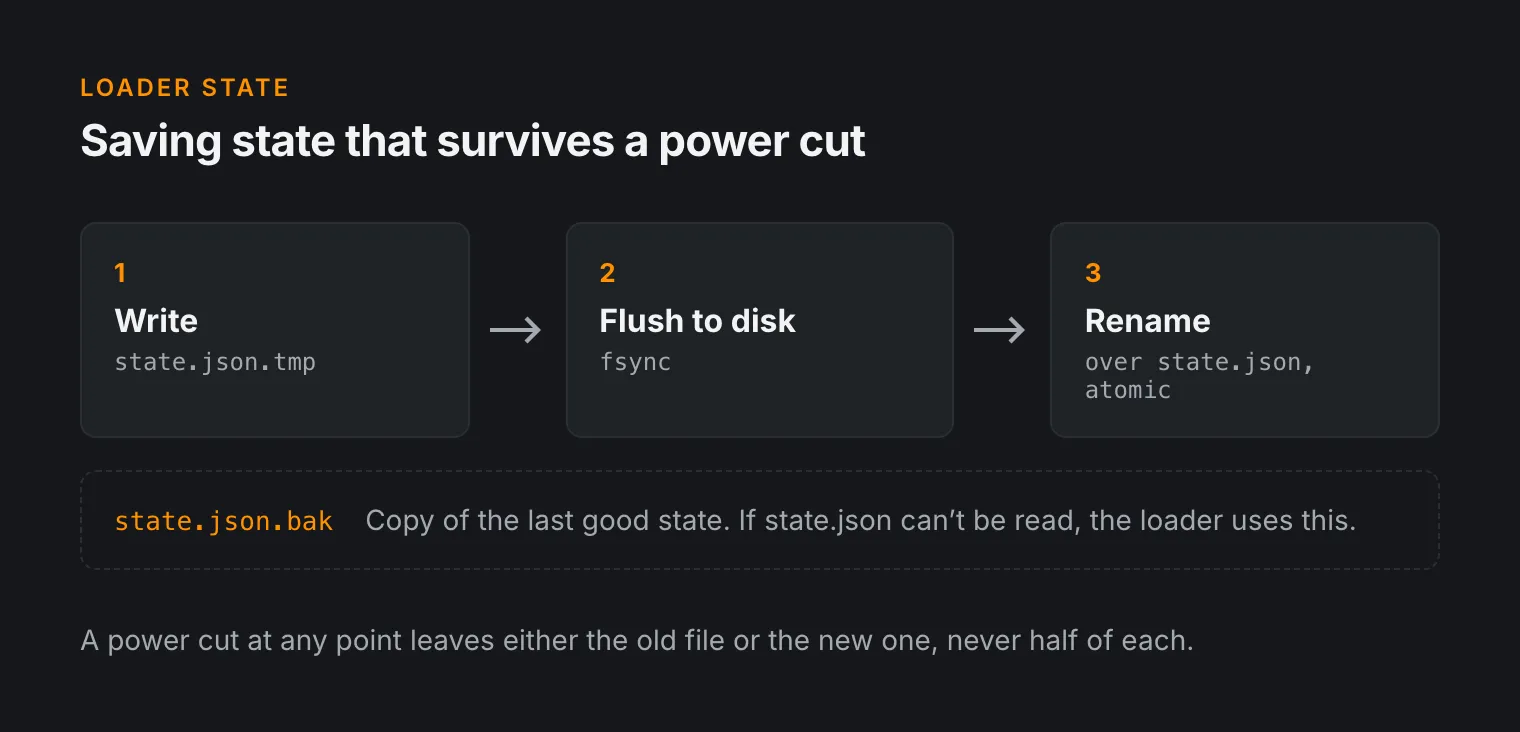
The loader keeps its state (active slot, failure count, installed versions) in a small JSON file. A power cut in the middle of writing it must not leave a corrupt file. So we never edit it in place.
- Write the new state to a temporary file.
- Flush it to disk.
- Rename it over the old file, which is atomic on Linux.
- Keep a
.bakcopy of the last good state and fall back to it if the main file can’t be read.
The Loader Stays Small
The loader only does what it has to: pick a slot, start the application, watch it, and switch if needed. Anything more complicated lives in the application, which does have a backup.
CI Checks the Loader Separately
A broken application costs you one slot. A broken loader breaks every device that receives it, because they all run the same one. So the build pipeline compiles and checks the loader before anything is packaged. A syntax error that would otherwise reach the whole fleet is caught in CI instead.
Setup Steps That Are Safe to Repeat
Updates aren’t only about the application. Over time, the devices also need system changes: new packages, configuration, services, log settings.
We split this into numbered, versioned setup steps. Each step records that it has run and checks whether its work is already done. If nothing has changed, it does nothing.
That gives you two things.
- A setup run interrupted by a power cut can simply start again from the top.
- A device that has been offline for months catches up by running only the steps it missed.
A Watchdog for the Watchdog
The application runs its own watchdog, but if that watchdog process stops, nothing would notice the application hanging. The loader therefore also checks that the watchdog is still running, and stops the application if it isn’t. A hung kiosk gets restarted instead of sitting frozen on screen for days.
Restart the Session, Not the Device
Our first version rebooted the whole Raspberry Pi after setup finished. That worked, but it was slow, and every reboot is another chance for something to go wrong: SD card wear, a slow network at boot, a peripheral that comes up in the wrong state.
Later we changed this to restart only the graphical session that runs the kiosk interface. The system stays up, the network stays connected, and the kiosk comes back without a full boot.
Starting from a Known Image
New devices start from a golden SD card image, a reference installation built and tested in advance. Every kiosk in the field starts from the same base, so a problem on one device can be reproduced on a desk instead of guessed at from a distance.
What We’d Tell Anyone Building This
- Assume power will fail at the worst moment. Write every state change so a cut at any point is survivable.
- Keep the part without a backup small and test it the hardest.
- Roll back based on evidence, not on a single failure.
- Make every setup step safe to repeat.
- Make devices reproducible, so field problems can be recreated in the lab.
None of these ideas is new, but together they mean a bad update costs a few restarts instead of a trip to every location.
Building an Update System?
If your devices need reliable field updates, whether that’s A/B slots on embedded Linux, a secure bootloader on a microcontroller, or getting ready for the Cyber Resilience Act, take a look at our secure updates service.
📧 Contact us at info@alsoft.nl or through our contact page.